
11 Powerful Keyword Research Tools You Need to Try

Chelsea Frost
Content Strategist
Content Strategist
Keyword research tools are nice to have. But often, they’re more than that. They are essential helpful tools for any content creator.
They help you uncover keywords, plan your content strategy, find out gaps in your existing research, etc. However… they can also break your wallet and make you waste your time. A good keyword tool should save you time.
In this article, we’ll look at 11 powerful tools for keyword research that are tried and tested, so you can find your perfect fit.
Disclaimer: At Yahini, we spend a ton of time testing, researching and using various tools to figure out which ones are worth recommending, evaluating them based on what they’re supposed to do and how well they meet our criteria. We do not accept payment for featuring a tool in our articles or linking to a site.
While most keyword research tools give you endless lists of data, Yahini takes a different approach. It acts as an AI Content Strategist, built to find the right keywords by first understanding the substance of your business and the strategy of the SERPs.
Instead of starting with a seed keyword, you start by giving Yahini your business context—your URL, competitors, and audience. It uses this “Brand Intelligence” to perform its automated keyword research, analyzing the market to find topics that are not just popular, but strategically important for you.
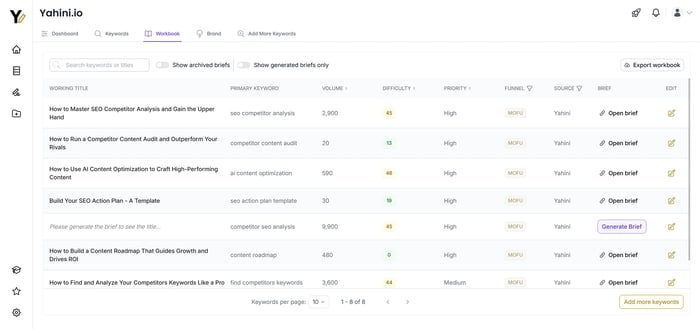
The output isn’t a spreadsheet of 10,000 keywords. It’s a prioritized list of topics, automatically clustered and mapped to the marketing funnel. From there, each validated idea can be turned into a full, strategist-level brief with a single click.
Here are some of Yahini’s pros:
And, a few cons that might or might not apply to you:
For $39 a month per project, you get access to all of Yahini’s features, letting you generate a full keyword strategy and 20 content briefs. Plans have month-to-month flexibility.
A completely free plan is also available to set up a project and try it out.
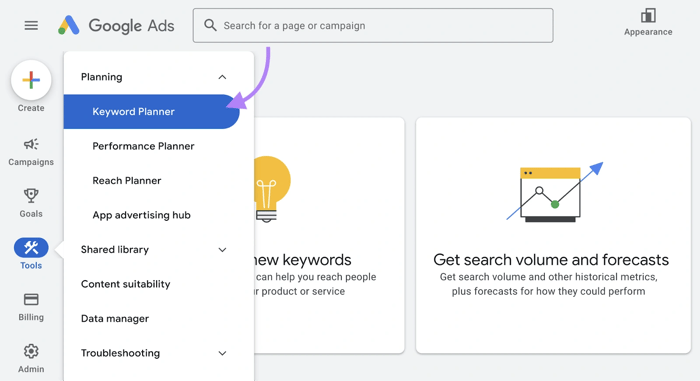
Google Keyword Planner is a free keyword tool used by advertisers to research and analyze keywords for their Google Ads campaigns. Many consider Google Keyword Planner the foundational keyword planner.
It provides you with basic keyword suggestions, keyword search volume data, and cost estimates for Google Ads. Google Keyword Planner also offers bid estimates.
It’s a great starting point for keyword research, but it has quite a learning curve for beginners. You need to create campaigns and set up a few things before using it for your advertising plans.
Google Keyword Planner is useful for getting a general idea of keyword popularity and potential ad costs. It’s integrated with Google Ads, making it convenient for those already using the platform.
It can provide your business with insights for Search ads and helps in finding the right campaign keyword.
Google Keyword Planner is free to use, but you need a Google Ads account to access it.
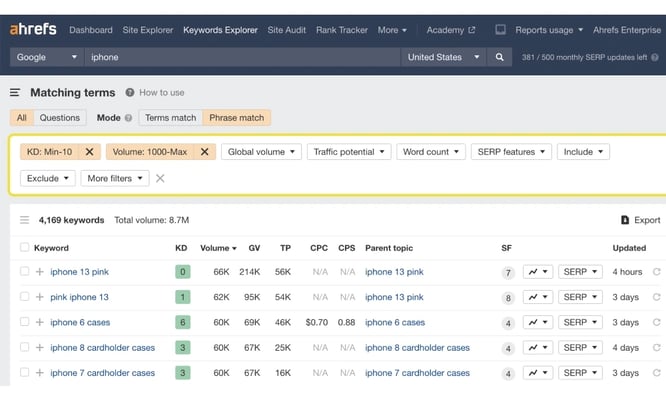
Ahrefs is renowned in the SEO world. Its keyword tool feature offers one of the most extensive data and features for SEO professionals.
While it provides in-depth keyword analysis and suggestions, it may be overwhelming for those new to SEO.
Ahrefs is great if you love data analysis. You’ll get search trends, difficulty scores, and a good look at what’s happening on search result pages.
Now, about the cost. Ahrefs’ basic plan starts at $99 a month. Many SEOs complain of the steep pricing, but for some companies, it might be worth it—especially if you use all their features, not just keyword research.
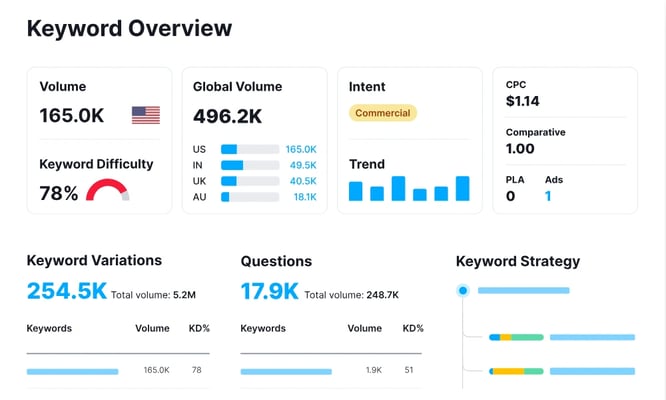
SEMrush digits into a massive database of 25 billion keywords. It’s easily comparable to Ahrefs, and it’s one of their biggest competitors.
The Keyword Magic Tool is great if you love exploring keyword metrics. It gives you information on keyword difficulty, search intent, and volume, as well as cool features like SERP features. It can also show you monthly searches for any given search term.
SEMrush offers different plans, but they’re not exactly cheap. The basic plan starts at $119.95 per month, which can be a bit steep if you’re just starting out or running a small business.
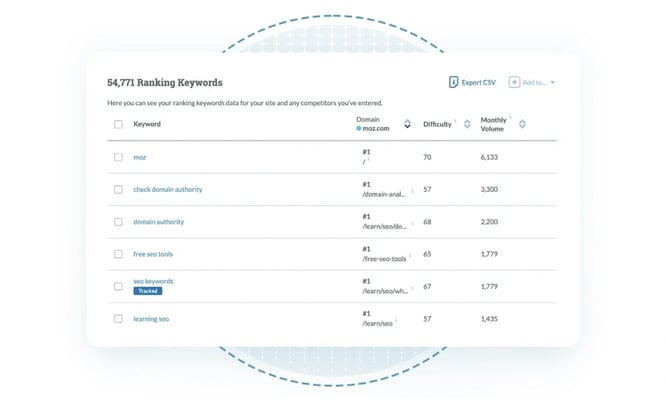
Moz helps you analyze things like search volume and keyword difficulty and even predicts how many clicks you might get if you rank for a keyword. Using Moz Keyword Explorer alongside Google Keyword Planner can give you a broader perspective.
One of the coolest features is its ability to find question-format keywords. These are great for creating content that directly answers what people are searching for. Plus, it gives you a peek at the SERP (Search Engine Results Page) for each keyword, so you can see what you’re up against.
Moz is fantastic if you want to get really detailed with your keyword research.
It’s great for understanding not just what keywords to target but why you should target them. This keyword tool helps you prioritize keywords based on their potential impact, which is super helpful when you’re planning your content strategy.
Moz Keyword Explorer is free to use.
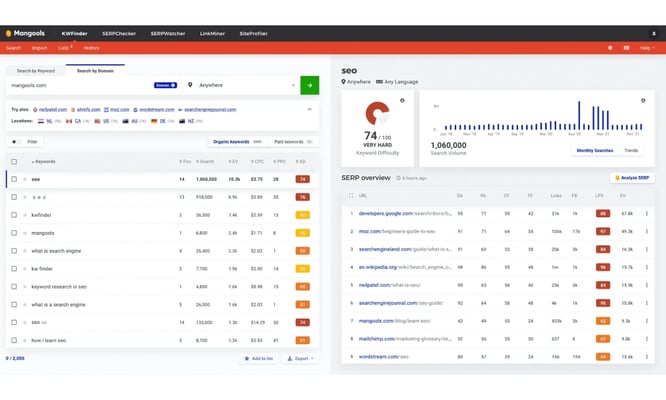
KWFinder gives you a clear picture of how difficult it’ll be to rank for each keyword. It pairs this with search volume data, so you can spot those sweet spots - keywords with decent search volume but low competition.
It’s also great for local SEO, letting you dig into location-specific keywords.
And if you’re curious about what’s working for your competitors, KWFinder can show you the keywords they’re ranking for.
KWFinder is perfect if you want a straightforward approach to keyword research. It’s especially useful if you’re focusing on long-tail keywords or local SEO. The interface is user-friendly, making it a good choice if you’re not an SEO expert.
It’s also a solid alternative to Google Keyword Planner for certain use cases.
KWFinder is part of the Mangools SEO suite, which starts at $29.90 per month when billed annually.
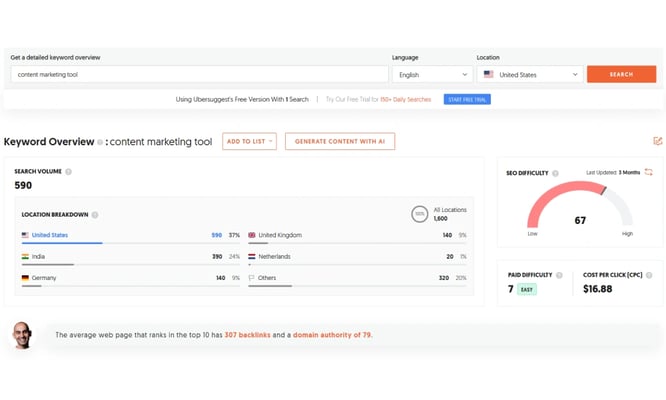
Ubersuggest lets you peek behind the curtain of your competitors’ strategies.
It also helps you find new keyword ideas, from broad topics to super-specific long-tail phrases. But it doesn’t stop there. Ubersuggest also dives into content ideas, showing you what’s getting shared and linked to in your niche. It can help you discover popular keywords if you’re shorter on budget.
And if you’re into backlinks (which, let’s face it, we all should be), it helps you find link-building opportunities by showing you who’s linking to similar content.
Ubersuggest is great if you want a well-rounded view of your SEO landscape without juggling multiple tools for keyword research. It’s particularly useful for competitor analysis and finding content ideas that are already proven to work. The interface is pretty user-friendly, making it accessible even if you’re not an SEO pro. It’s a decent keyword planner for beginners.
Ubersuggest has a free plan with limited features, which is nice for dipping your toes in. Paid plans start at $29 per month when billed annually.
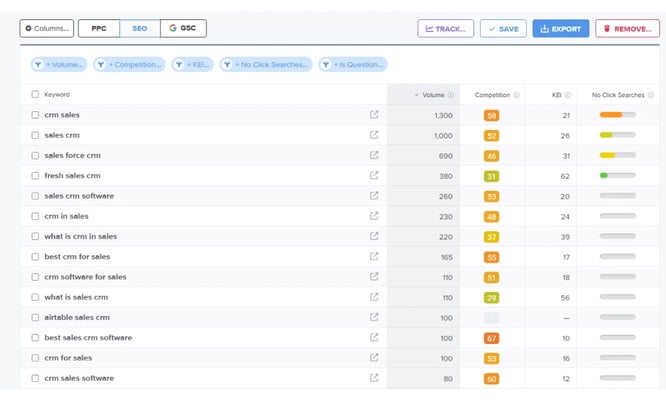
What sets Wordtracker apart is its blend of data sources. It pulls from Google, sure, but it also has its own proprietary search technology. This keyword planner also aims to provide you with unique data points.
One of the neatest features is how it helps you find related terms. This is super useful for creating content that covers all angles of a topic.
The tool is especially useful if you’re looking to uncover hidden keyword opportunities that your competitors might have missed. The tool is designed to give you more than just a list of keywords; it provides context and insights that can shape your entire content strategy.
Wordtracker starts at $27 per month when billed annually. This puts it in the mid-range of keyword research tools.
KeywordTool.io takes your seed keyword and plays around with it, adding letters and numbers before and after to see what Google suggests. This means you’re getting keyword ideas that are closely related to what people are really searching for for any search query. Consider using it alongside Google Trends for broader insights.
And it’s not just limited to Google - you can use it for YouTube, Bing, Amazon, and even social media platforms like Instagram and Twitter.
Keywordtool.io is great if you want to start targeting long-tail keywords. These are the more specific, often less competitive phrases that can be gold for content creation and SEO, helping drive organic traffic to your blog posts. It’s particularly useful if you’re interested in understanding the questions and topics your audience is curious about.
The free version gives you up to 750+ keyword suggestions, which is pretty generous.
Free to use.
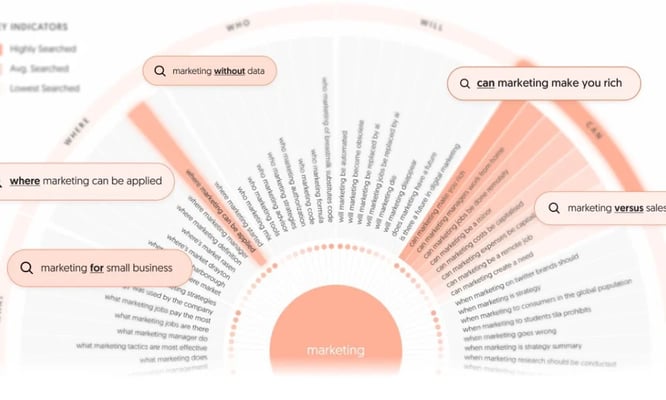
ATP taps into autocomplete data from the search engines. It takes your keyword and spins it into a web of questions, prepositions, and comparisons that people are actually typing into the search bars.
If you want to understand the questions and concerns your audience has about a topic, then use Answer the Public. It’s useful for coming up with blog ideas, FAQ sections, or even product development insights.
One free search is available.
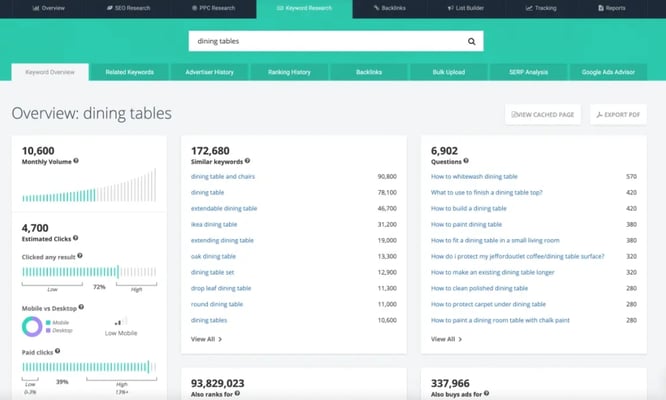
SpyFu digs deep into your competitors’ SEO and PPC tactics, whether you want to know every keyword they’ve ever bought on Google Ads or you’re curious about their organic rankings.
It even shows you their ad variations over the last 18 years.
The tool is particularly useful for SEO specialists and PPC managers who need in-depth competitive intelligence. The historical data is a goldmine for spotting trends and understanding what works in your industry.
Membership starts at just $33/month.
You’ve got a few options above, and truth be told, the internet’s full of keyword research tools.
Here’s how to make sure you’re making the smart choice when pulling out your wallet at a keyword research tool.
When you’re shopping for a keyword research tool, keep these key factors in mind:
Your keyword research is only as good as the data behind it. Look for tools that pull from multiple sources and update frequently. You want fresh, reliable data that covers a wide range of keywords and search volumes.
Don’t settle for tools that give you ballpark figures. The best ones provide precise search volumes, funnel stage or keyword intent, and even competition level. This level of detail can be the difference between ranking on page one or getting lost in the depths of search results.
A powerful tool is useless if you can’t figure out how to use it. The best keyword research tools have intuitive interfaces that make sense from the get-go. You shouldn’t need a PhD to navigate the dashboard or interpret the results.
The less time you spend figuring out the tool, the more time you can spend actually improving your SEO strategy.
Budget matters, but don’t just go for the cheapest option.
Consider what you’re getting for your money. Some tools might seem pricey at first glance but offer features that more than pay for themselves in the long run.
Look at the different pricing tiers and what they offer.
Do you need all the bells and whistles, or will a more basic plan suffice?
Remember, the goal is to find a tool that gives you the best return on your investment, not just the lowest price tag.
Every keyword research tool has its own special sauce. Some offer AI-powered suggestions, others excel at local SEO research. Yahini, for example, stands out for the fact that it performs keyword research for you already, giving you all the necessary information to build a content strategy.
When choosing a keyword research tool, start by listing out your must-haves.
What features can’t you live without?
What problems are you trying to solve?
This will help you narrow down your options quickly.
Next, take the tools that made your shortlist for a test drive. Most offer free trials, so take advantage of them. Pay attention to how the tool feels to use day-to-day. Is it making your job easier or just adding to your workload?
Finally, consider scalability. Your needs might be basic now, but what about six months down the line? A tool like Yahini grows with you, offering advanced features you can use as your SEO strategy evolves.
Tens of keyword research tools are available, including your own SEO mind and judgment. But you do need access to the data to make informed decisions.
With the right tool in your arsenal, you’ll have access to opportunities you never knew existed.
And speaking of the perfect fit…
Yahini is a strategy-first content operations platform that does that strategic work for you. AI agents trained on your Brand Intelligence automatically score keywords by business impact, cluster them by theme, map them to funnel stages, and generate strategic briefs. You go from research to execution without the manual grind. It’s keyword research that connects directly to your content plan and operational workflow.
Ditch the generic outlines! Sign up now.
Want keyword research that connects to strategy? See how Yahini automates the entire workflow.
Any questions? I’m happy to help! Just reach out to us!
Not ready yet? Learn more about Yahini here.